
Model the work
Describe completion and sequence with Work, Start and Reset.
Model task sequences and connections between systems with DS. Explore production operations with Plant Doctor. Start learning, planning an implementation or building a partnership here.
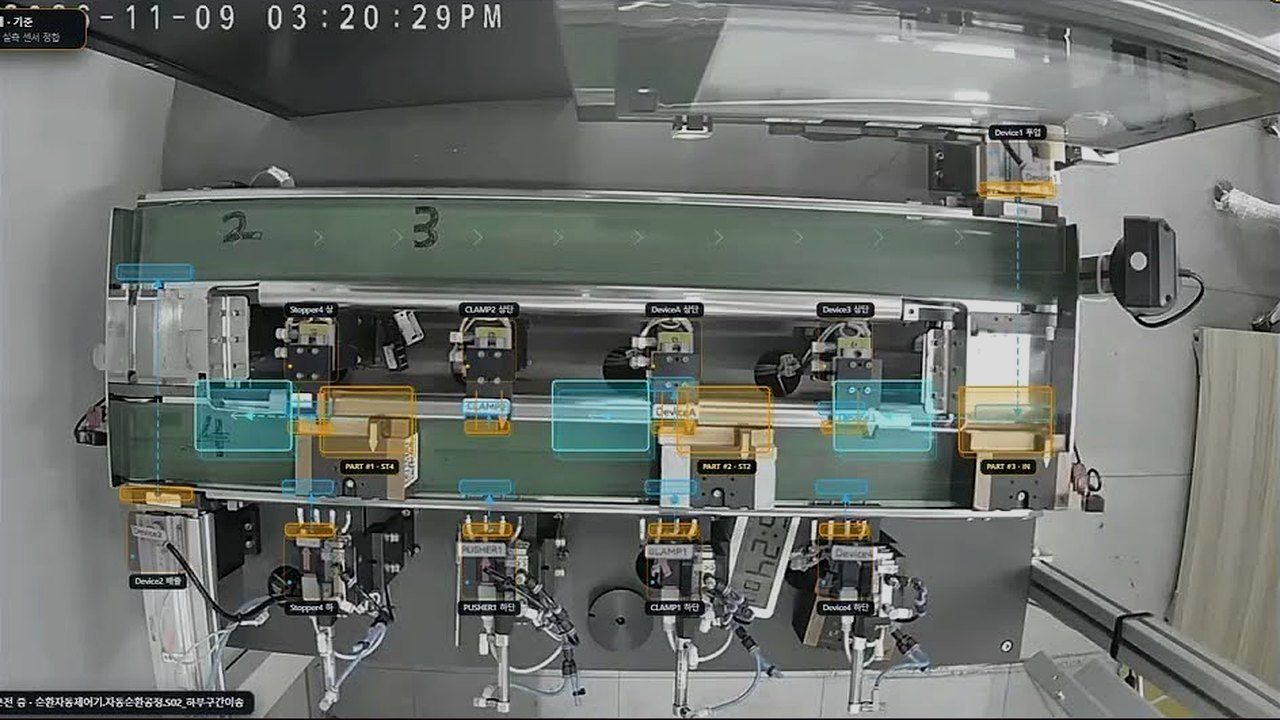
Describe completion and sequence with Work, Start and Reset.
Connect control boundaries using System, Call and TAG.
Explore operating status, alerts and reports in Plant Doctor.
NEW · DualSoft MCP in action
Nobody wrote control code by hand or clicked through operator screens. The AI called the functions it needed through DualSoft MCP, built and applied the control logic, and the demo equipment ran automatically.
The AI works out the layout and motion of the equipment from the camera feed. The connected AI does the viewing; the DualSoft MCP server never receives the video.
The AI writes a DS process model; DualSoft MCP compiles it, verifies the run and returns the evidence.
The verified logic is applied to the PLC and the equipment runs automatically. Connecting to, writing to and deploying on a PLC require verified owner credentials.
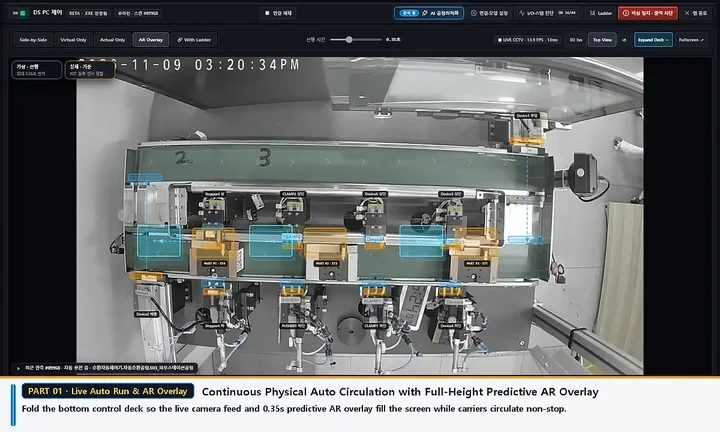 0:00
A 0.35-second predictive AR overlay sits on the live camera while carriers circulate non-stop.
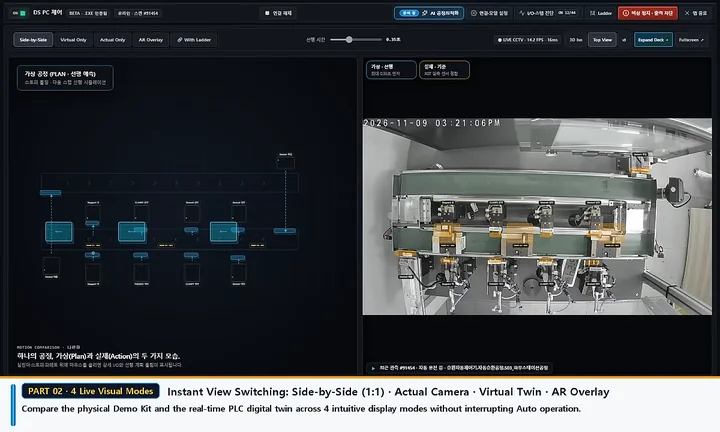 0:14
Switch between side-by-side (1:1), camera only, virtual twin and AR overlay without stopping the automatic run.
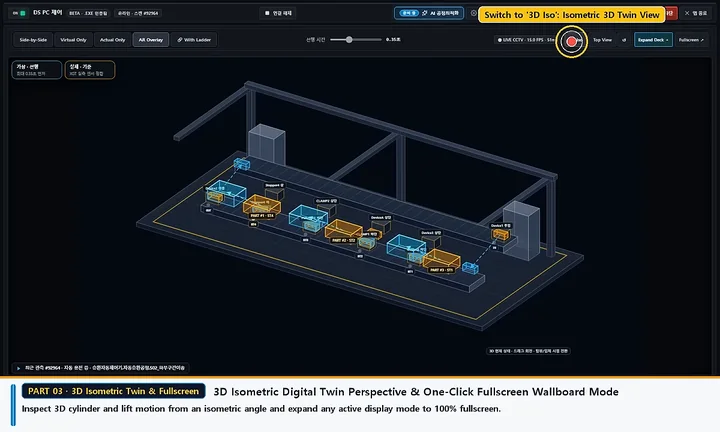 0:29
Watch cylinder and lift motion from an isometric 3D angle, then expand any view to a full-screen wallboard in one click.
 0:43
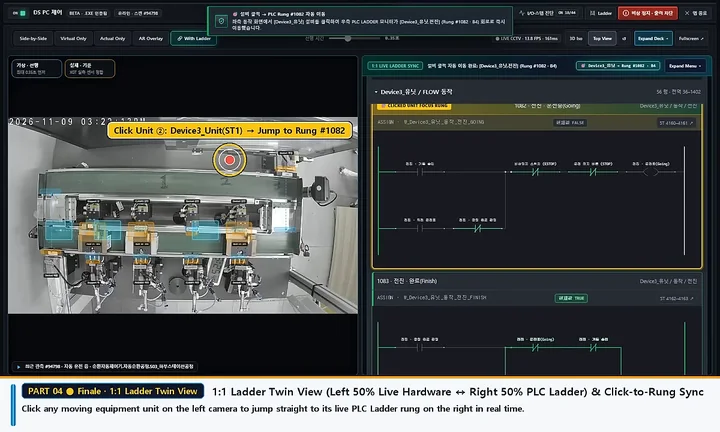
Click a moving unit in the live camera on the left to jump to its live PLC ladder rung on the right.
The equipment is a demo kit with a conveyor, stoppers, clamps and pushers, filmed with a live camera on November 9, 2026. Subscribe on YouTube
What we do
We turn processes into models, connect equipment information through the AAS standard and put shop-floor data to work.
Model task sequences and connections between devices in the DS language, then use the same model for simulation, 3D review, IDTA AAS Repository sync, and product passport (DPP) export.
Connect equipment and product assets to IDTA Part 2 AAS Repositories, and export product passports (.dpp.aasx) from DS Studio.
Uses equipment data read from PLCs for OEE, anomaly signs and maintenance decisions, shop-floor alerts, dashboards and an AI assistant.
Get installers for DS Pilot and other DualSoft software from the download center and learn how to use them in the online manual.
Run industry processes such as automotive, semiconductor and food lines in 3D in your browser, and connect virtual and physical signals through one model.
Conversion tools read PLC programs and operation logs, and AI reads equipment documents, to draft a process model. DualSoft engineers review it, add nameplate and connection data, and deliver an IDTA-standard AAS package (.aasx).
3D SCENE DEMO
Compare a virtual and a physical process in one 3D scene. Use the side-by-side and overlay views to see where the motion differs; drag to rotate, Ctrl + scroll to zoom. This is an illustrative simulation and is not connected to real equipment.
DEMO
Explore modeling, data connections and equipment operations through the demos.

Open an example or describe a sequence in your own words, then simulate it with HMI and 3D. No real PLC needed.
Open demo · New tab
Explore standardized asset information and data connections.
Open demo · New tab
From WorkBit (0/1) to TAG (I/O) on every layer: the ds2 v2 fractal structure in 3D.
Open demo · New tab
Watch an LS XGK PLC program being converted to AAS (AASX), start to finish.
Watch video · 48 sec
Click 3D AAS icons on the left to query machine SequenceControl submodels from the in-house AAS Repository, and watch per-serial Product AAS (DPP) instances register for the Data Space on the right.
Open demo · New tab
Walk down a finished plant in six levels, from the whole site to a single part.
Open demo · New tabRESOURCES
Go straight to the resources you need, from first steps to a technical evaluation.
8 chapters and 64 scenes, with explanations and audio in your selected language.
ExploreExplore the confirmed specification through 12 topics, 24 lessons and interactive examples.
ExploreExplore electronics, automotive, battery and energy production lines in 3D in DS Studio.
ExploreAAS Repository & Discovery REST APIs (Part 2), Data Space access rules (Part 4), semanticId, globalAssetId, and AASX serialization (Part 5) explained against the v3 specifications.
ExploreFind product introductions, partnership proposals and technical presentations.
ExploreChoose films and autoplay tutorials in four languages.
ExploreThis site, the DS learning guide, modeling videos and narrated tutorials support four languages. Other technical resources and external demos open in their stated original language.
Tell us about your equipment, goals or partnership plans.